
| Course | Microprocessor Based Product Design |
|---|---|
| Course Number | 00340032 |
| Ido Fang Bentov | Nir Karl |
|---|---|
| CLASSIFIED | CLASSIFIED |
| CLASSIFIED | CLASSIFIED |
Station Number: 8
Brief Overview
This lab involves programming an STM32F446 microcontroller to control a robotic system consisting of stepper motors, encoders, and LEDs. The goal is to implement a system where the user manually rotates a robotic arm (Motor 3) to a certain angle. Upon detecting that the arm is stable at this new angle for 5 seconds, the system automatically drives the entire cart (via Motor 1 or Motor 2) to rotate by the same angle, and then adjusts the arm to maintain its original absolute orientation (effectively resetting the arm’s angle relative to the cart to zero).
The system utilizes:
- Stepper Motors: For driving the cart wheels (Motor 1, Motor 2) and the arm (Motor 3).
- Quadrature Encoders: For reading the position of the motors.
- GPIO LEDs: For status indication (blinking during idle and motion).
- UART: For transmitting debug information and system status to a PC.
- Timers: For encoder reading, time tracking (stability), and delay generation.
Compliance for the Different Tasks
1. Stability Detection
The system continuously monitors the angle of the arm (Motor 3). The process_stability function tracks whether the encoder reading has remained unchanged for a defined threshold (5 seconds).
/**
 * Process stability detection when not currently moving.
 * If the angle changes, restart the stability timer. If unchanged for
 * STABLE_THRESHOLD, mark target and start moving.
 */
static void process_stability(uint32_t current_time) {
	if (prev_angle_abs != current_angle_abs) {
		/* Angle changed while stationary — start/restart stability timer */
		is_stable = false;
		start_time = current_time;
		is_moving = false;
	} else {
		/* Angle unchanged — check stability timeout */
		is_stable = true;
		if ((current_time - start_time) > STABLE_THRESHOLD) {
			target_angle_abs = current_angle_abs;
			is_moving = true;
		}
	}
}
Explanation:
- The function compares
current_angle_abswithprev_angle_abs. - If they differ, it implies the user is still moving the arm, so
start_timeis reset tocurrent_time. - If they are the same, it checks if the elapsed time since
start_timeexceedsSTABLE_THRESHOLD(5000 ms). - Once stable,
is_movingis set totrue, triggering the motion sequence.
2. Robot Rotation Logic
When stability is detected, the rotate_robot_to_angle function calculates the required wheel rotation to turn the robot body by the target angle.
static void rotate_robot_to_angle(float current_angle_abs, float target_angle_abs) {
	// Placeholder for motor control logic to rotate robot to target_angle_abs
	// This would involve calculating the required motor steps and
	// commanding the motor drivers accordingly.

	float angle_diff_deg = target_angle_abs;
	if (angle_diff_deg > 180.0f) {
		angle_diff_deg -= 360.0f;
	} else if (angle_diff_deg < -180.0f) {
		angle_diff_deg += 360.0f;
	}
	float angle_diff_rad = angle_diff_deg * M_PI / 180.0f;
	float num_of_revs = ROBOT_WIDTH * angle_diff_rad / WHEEL_CIRCUMFERENCE;
	float angle_to_rotate = num_of_revs * 360.0f;

	float robot_turn_direction = (angle_to_rotate > 0) ? 1 : -1;

	// TODO Deal with the case where the number of revolutions is less than 0.1

	if (robot_turn_direction == 1) {
		turn_motor(&MOTOR_1, angle_to_rotate, 1, MOTOR_SPEED);
	} else {
		turn_motor(&MOTOR_2, angle_to_rotate, 0, MOTOR_SPEED);
	}


	reset_robot_arm(MOTOR_SPEED);
	reset_state(HAL_GetTick());
}
Explanation:
-
Angle Normalization: The code normalizes the target angle to be within the range
-
Kinematics: It calculates
num_of_revsrequired for the wheel based on theROBOT_WIDTHandWHEEL_CIRCUMFERENCEto achieve the desired body rotationangle_diff_rad.
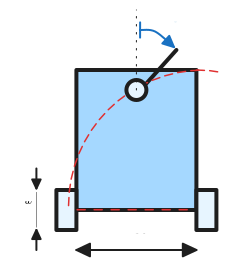
Figure HW1.1: Schematics of the robot and the dimensions used for calculating
num_of_revs.The calculation is done as follows:
where
num_of_revs, -
Motor Selection: Depending on the direction (
robot_turn_direction), it commands eitherMOTOR_1orMOTOR_2to turn. -
Arm Reset: After robot has turned, calls
reset_robot_armto bring Motor 3 back to its zero position relative to the chassis, ensuring it points in the original absolute direction. -
Reset State: Finally, it resets the system state to wait for the next user input.
3. Motor Control
The turn_motor function handles the low-level stepping of the motors at a constant speed and UART logging during motion.
static void turn_motor(motor_type* motor, float angle_to_rotate, uint8_t direction, float speed) {
	angle_to_rotate = fabs(angle_to_rotate);

	HAL_GPIO_WritePin(motor->port, motor->enable_pin, MOTOR_ENABLE);
	HAL_GPIO_WritePin(motor->port, motor->direction_pin, direction);
	HAL_GPIO_WritePin(motor->port, motor->res_pin, GPIO_PIN_RESET);

	float motor_start_angle = read_current_angle(motor);

	uint32_t speed_steps_per_s = speed * MOT_STEPS_PER_REV;
	uint32_t delay_ms = 1000 / speed_steps_per_s;
	uint32_t delay_ms_half = delay_ms / 2;

	static uint32_t last_print_time = 0;


	while (fabs(read_current_angle(motor) - motor_start_angle) <= angle_to_rotate) {
		// ... LED and UART logic (detailed in sections below) ...

		HAL_GPIO_WritePin(motor->port, motor->step_pin, GPIO_PIN_SET);
		HAL_Delay(delay_ms_half);
		HAL_GPIO_WritePin(motor->port, motor->step_pin, GPIO_PIN_RESET);
		HAL_Delay(delay_ms_half);
	}
	HAL_GPIO_WritePin(motor->port, motor->enable_pin, MOTOR_DISABLE);
}
Explanation:
- Enables the motor and sets the direction pin.
- Calculates the step delay based on the requested
speed(revs/sec). - Enters a loop that continues until the motor has rotated by
angle_to_rotate. - Toggles the
step_pinhigh and low with delays to generate steps. - Disables the motor after the movement is complete.
4. LED Indication
The system provides visual feedback via LEDs on Port D.
Idle State (Blinking All):
In the main loop, when !is_moving:
if (should_tick % 500 < 250) {
	update_leds(should_tick ? (bool[8]){1, 1, 1, 1, 1, 1, 1, 1} : (bool[8]){0, 0, 0, 0, 0, 0, 0, 0});
}
This blinks all 8 LEDs every 1 second (500ms ON, 500ms OFF).
The function update_leds takes an array of Booleans and turns on or off LEDs 1-8 correspondingly.
Moving State (Direction Indication):
Inside turn_motor:
	uint32_t current_time = HAL_GetTick();
	bool should_tick = current_time % 500 < 250;
	bool leds_to_tick[8];
	if (direction == 1) {
		memcpy(leds_to_tick, (bool[8]){1, 1, 1, 1, 0, 0, 0, 0}, sizeof(leds_to_tick));
	} else {
		memcpy(leds_to_tick, (bool[8]){0, 0, 0, 0, 1, 1, 1, 1}, sizeof(leds_to_tick));
	}
	if (should_tick) {
		update_leds((bool[8]){0, 0, 0, 0, 0, 0, 0, 0});
	} else {
		update_leds(leds_to_tick);
	}
This logic blinks the Left 4 LEDs (indices 0-3) or Right 4 LEDs (indices 4-7) depending on the rotation direction.
5. UART Communication
During motion, the system outputs status information to the UART every ~1 second.
	current_time = HAL_GetTick();
	if (current_time - last_print_time >= 900) {
		last_print_time = current_time;
		char debug_buf[128];

		// ... Angle calculation ...

		sprintf(debug_buf, "fabs(cur_angle - start): %ld.%04ld, angle_to_rotate: %ld.%04ld\r\n",
				(long)(diff_int / 10000), (long)(abs(diff_int) % 10000),
				(long)(angle_int / 10000), (long)(abs(angle_int) % 10000));
		HAL_UART_Transmit(&huart3, (uint8_t*)debug_buf, strlen(debug_buf), HAL_MAX_DELAY);

		sprintf(debug_buf, "Enc1: %lu, Enc2: %lu, Diff: %ld\r\n",
			(unsigned long)MOTOR_1.htim->Instance->CNT,
			(unsigned long)MOTOR_2.htim->Instance->CNT,
			(long)(MOTOR_1.htim->Instance->CNT - MOTOR_2.htim->Instance->CNT));
		HAL_UART_Transmit(&huart3, (uint8_t*)debug_buf, strlen(debug_buf), HAL_MAX_DELAY);
	}
Explanation:
- The code checks if 900ms have passed since the last print. This ensures a message is sent every
- It formats a string containing the current progress (angle deviation) and the raw encoder values for Motor 1 and Motor 2.
HAL_UART_Transmitsends this data to the PC.- Float values are formatted manually (integer + fractional part) to avoid potential floating-point support issues in
sprintfon embedded targets, or simply for custom formatting control.
6. Reset Logic
The system allows for a manual reset via an external button (connected to PE8) or programmatic reset (which happens after the robot has completed its rotation).
static void reset_state(uint32_t current_time) {
	is_stable = false;
	is_moving = false;
	start_time = current_time;
	target_angle_abs = 0.0f;
	current_angle_abs = 0.0f;
	prev_angle_abs = 0.0f;

	HAL_GPIO_WritePin(MOTOR_1.port, MOTOR_1.enable_pin, MOTOR_ENABLE);
	HAL_GPIO_WritePin(MOTOR_2.port, MOTOR_2.enable_pin, MOTOR_ENABLE);
	HAL_GPIO_WritePin(MOTOR_3.port, MOTOR_3.enable_pin, MOTOR_DISABLE);
}
Explanation:
- This function re-initializes all state variables.
- Critically, it disables
MOTOR_3(the arm motor) to allow the user to freely rotate it again for the next input, while enabling the drive motors (MOTOR_1,MOTOR_2) to hold the cart in place.